Official OBS Plugins
Built by Velora, for Velora. Stream straight from OBS with the codecs and tooling the rest of the platform was engineered around. No third-party relay, no guesswork.

For the best experience and a viewer-facing mixer, try the VELoQ plugin.
Every audio source goes out as its own track, so your viewers can mix your stream their way.
Already on VELoQ? Setup & audio mixer guide
Velora.tv WHIP Streamer
Log In. Go Live.
The official OBS plugin for streaming straight to Velora. No stream keys, no server URLs, no bitrate guesswork. Sign in and go live. An adaptive simulcast ladder tuned to your hardware, your bitrate set from your resolution, and a one-click link that puts Velora chat in an OBS dock.
Legacy plugin
VELoQ Streamer is our recommended plugin and gets new features first. This one still works and gets fixes, but is updated less often.


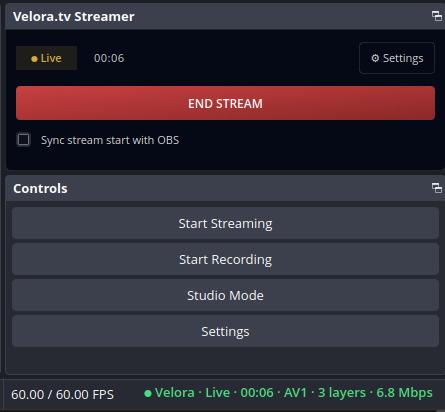
The dock inside OBS: live, 3 simulcast layers.
Why Velora Streamer
- ✓Log in and go liveNo stream keys, no server URLs, no bitrate guessing. Sign in once and hit Go Live.
- ✓Best quality, automaticallyVelora picks the right encoder and quality for your machine and connection. Nothing to tune.
- ✓Chat + activity right in OBSOne click copies an already-signed-in link. Paste it into OBS under Docks → Custom Browser Docks and your chat lives in OBS.
›Something not working?
If something looks off while you're streaming, tell us from inside OBS. Open the Velora settings window, go to Account, and press Report a problem. Say what happened in your own words. Your latest OBS log rides along, so we can see what you saw.
You'll get a short reference code back that looks like VR-7K2M-9QX4. Keep it handy.
Want to talk it through with a human? Open a ticket in our Discord's #open-a-ticket channel, pick Velora OBS Plugin Support, and bring your reference code or your Velora username. That's all we need to pull the whole picture up.
Join us on Discord →Install on Windows
- 1Close OBS Studio if it’s running.
- 2Run the downloaded VeloraStream-Setup installer.
- 3The installer auto-detects your OBS install, including portable / standalone copies. If you run portable OBS in an unusual spot, use Browse… to point it at your OBS folder.
- 4Launch OBS. In the menu bar choose Docks → enable “Velora.tv Streamer”.
- 5Open the dock, click Sign in to Velora, then Go Live. That’s it.